
android studio安装问题
时间:2014-07-16 21:39:23
收藏:0
阅读:261
问题:
No JVM installation found. Please install a 64-bit JDK. If you already have a JDK installed, define a JAVA_HOME variable in Computer > System Properties > System Settings > Environment Variables.Setting ANDROID_STUDIO_JDK solves the above error as well.
解决办法:
网上很多人都说设置环境变量就可以解决问题。如果你以前用eclipe的时候没有问题,或者说你已经设置好环境变量了。还是出现以上问题,那就请试试我的方法。
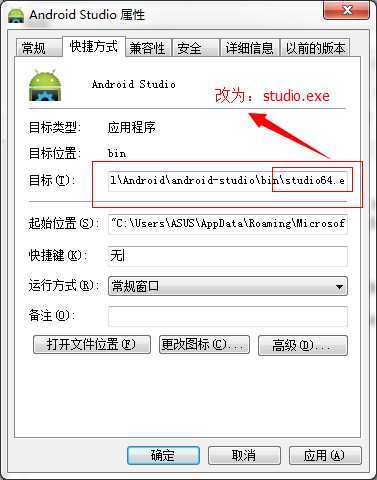
其实很简单,开始菜单中的快捷方式指向的是studio64.exe,而不是studio.exe。你可以将快捷方式的目标路径改过来,也可以在安装目录下,打开studio.exe.
评论(0)