
Configure the Windows Phone 8.1 Emulator to work with Fiddler
时间:2014-11-22 17:21:56
收藏:0
阅读:514
- Run Fiddler.
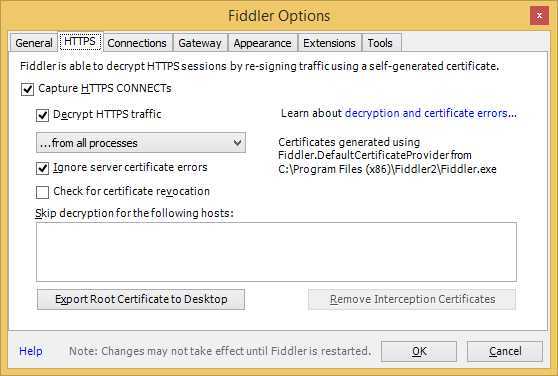
- Run Fiddler and choose (from the menu) Tools, Fiddler Options… Check these boxes in the HTTPS tab of the resulting dialog (and hit OK):
- Click
Tools>Fiddler Options>Connections. Change theFiddler Listen Portfrom8888to something else, e.g.8889. (The Windows Phone team decided to steal port 8888 for their debugger).Set these options in the Connections tab and then hit OK: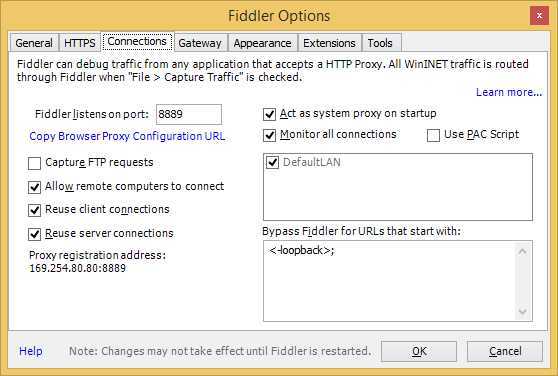
- Set Proxy in the Gateway tab and then hit OK(this step is according the requirement. if required, then do this setting, else not):.
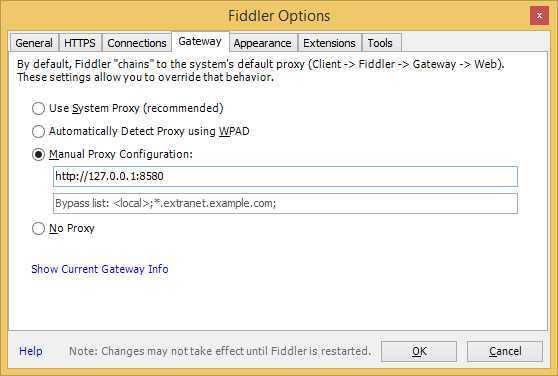
- Click
Okbutton - In the QuickExec box below Fiddler‘s session list, type
prefs set fiddler.network.proxy.RegistrationHostName 169.254.80.80where the IP address is found at the top of the tooltip you see when hovering over theOnlineindicator at the top-right of Fiddler‘s toolbar. - Restart Fiddler.
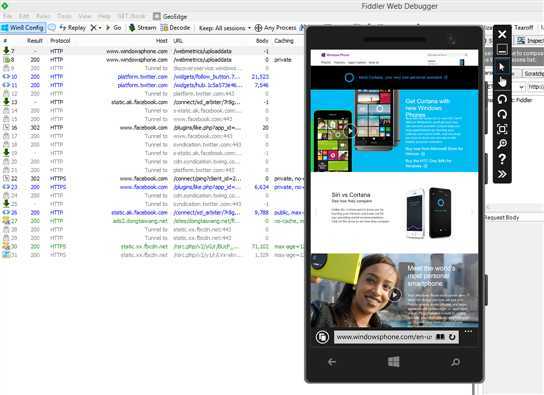
- Start VS 2013 and load your project. Click
Runfor theWindows Phone 8.1 emulator. - done.
reference:
http://blogs.msdn.com/b/wsdevsol/archive/2013/06/05/configure-the-windows-phone-8-emulator-to-work-with-fiddler.aspx
http://stackoverflow.com/questions/23462697/windows-phone-8-1-emulator-not-proxying-through-fiddler
评论(0)