
Docker 命令和运行原理简单剖析
时间:2021-06-30 18:06:59
收藏:0
阅读:0
Docker 运行原理简单剖析
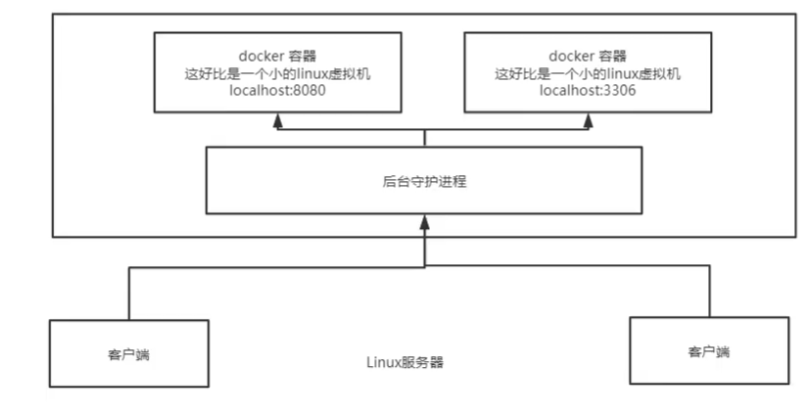
Docker是CS架构,Docker的守护进程运行在主机,通过socket从客户端进行访问.
Docker server端:接受到C端指令,执行命令
Docker常用命令
-
帮助命令
docker version #显示版本号
docker info #显示系统信息,包括镜像和容器数量等
docker --help #帮助命令 -
镜像命令
-
docker images 查看dokcer上的所有镜像命令
Options:
-a, --all Show all images (default hides intermediate images)
--digests Show digests
-q, --quiet Only show image IDs
-f, --filter filter Filter output based on conditions provided
--format string Pretty-print images using a Go template
--no-trunc Don‘t truncate output
其中-f不太用,a和q比较常用,也可以组合起来使用,输出所有的镜像id;
过滤标志-f or –filter格式为key=value。如果超过一个过滤,那么就传递多个标志[如–filter “foo=bar” –filter “bif=baz”]。
目前支持的过滤有:
dangling [布尔值 true或false]
label (label=或label==)
before ([:], or ) – 过滤出指定镜像之前的镜像
since ([:], or ) – 过滤出指定镜像之后的镜像 -
docker search 搜索命令
-f, --filter filter Filter output based on conditions provided
--format string Pretty-print search using a Go template
--limit int Max number of search results (default 25)
--no-trunc Don‘t truncate output
例:docker search mysql -f stars=5000 -
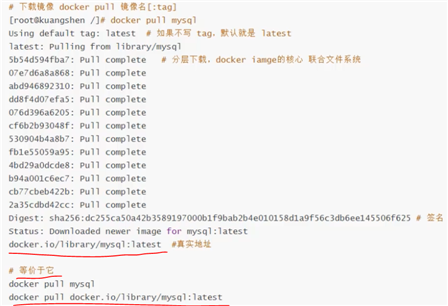
docker pull 拉取 下载命令, 也可以docker pull 镜像名字:tag 选择固定版本的镜像,版本需要网页上去看,支持哪些版本
例:docker pull mysql:5.7
Options:
-a, --all-tags Download all tagged images in the repository
--disable-content-trust Skip image verification (default true)
--platform string Set platform if server is multi-platform capable
-q, --quiet Suppress verbose output
-
docker rmi 删除镜像
Options:例:docker rmi 容器ID1 容器ID2,也可以在-f后加其他运算条件的参数,例:docker rmi -f $(docker images -aq) 把所有的docker id传到$()这个变量接收器中,删除所有!!
-f, --force Force removal of the image
--no-prune Do not delete untagged parents
评论(0)