
CSS3新增的选择器
时间:2020-03-22 15:55:53
收藏:0
阅读:92
1. 层次选择器
- 子元素选择器: 只选择子元素 父选择器 > 子选择器
- 后面紧相邻的兄弟元素: 选择器1 + 选择器2
- 后面所有的兄弟元素: 选择器1 ~ 选择器2
2.属性选择器 [属性名]
- 选择具有指定属性名的元素 [属性名]
- 选择具有指定属性名并且属性值为指定 [属性名=属性值]
- 选择具有指定属性名并且属性值中包含某个单词 [属性名 ~= 属性值] 单词与单词之间: 使用空格
- 选择具有指定属性名并且属性值中以某个单词开头: 单词之间使用空格分隔, 是连接符 - 连接的 [属性名 |= 属性值]
- 选择具有指定属性名并且属性值中以某个字符开头: [属性名 ^=值]
- 选择具有指定属性名并且属性值中以某个字符结尾: [属性名 $=值]
- 选择具有指定属性名并且属性值中包含某个字符结尾: [属性名 *=值]
-
<!DOCTYPE html>
<html lang="en">
<head>
    <meta charset="UTF-8">
    <title>Document</title>
    <style type="text/css">
        p{
            margin: 10px;
        }
        /*查找含有href属性为http的a元素*/
        /*a[href^="http"]{
            background-color: yellow;
        }*/

        /*a[href$="pdf"]{
            background-color: pink;
        }*/

        /*a[href*="age"]{
            background-color: orange;
        }*/

    </style>
</head>
<body>
    <p><a href="http://www.baidu.com/name.pdf">PDF文件</a></p>
    <p><a href="http://www.baidu.com/name.svg">SVG</a></p>
    <p><a href="http://www.baidu.com/name.ppt">PPT文件</a></p>
    <p><a href="http://www.baidu.com/age.xls">age.XLS文件</a></p>
    <p><a href="http://www.baidu.com/name.pdf">PDF文件</a></p>
    <p><a href="www.baidu.com/name.pdf">PDF文件</a></p>
    <p><a href="http://www.baidu.com/age.gif">age.GIF文件</a></p>
    <p><a href="http://www.baidu.com/name.pdf">PDF文件</a></p>
</body>
</html>
3.过滤选择器: :过滤条件
- 选择第一个字符 :first-letter
- 选择第一行 :first-line
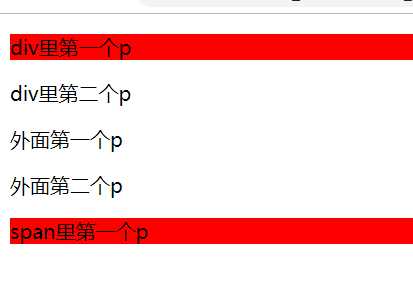
- 选择第一个子元素 :first-child 位置的第一个 选择器:first-child: 选择指定第一个子元素选择器 注意: 选择器: 子元素 *
- 选择最后一个子元素 :last-child
-
<style>
        /* odd奇数,oven偶数 */

        /* 一个标签内,第一个为p的子元素 */
        p:first-child{
            background-color: red;
        }

    </style>
</head>
<body>
    <div>
        <p>div里第一个p</p>
        <p>div里第二个p</p>
    </div>

    <p>外面第一个p</p>
    <p>外面第二个p</p>
    <span>
        <p>span里第一个p</p>
    </span>
</body>
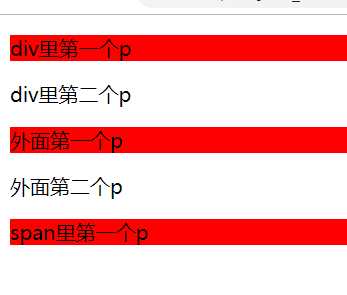
- 选择的是子元素中某个指定选择器第一个 :first-of-type 类型的第一个 *
- 选择的是子元素中某个指定选择器类型最后一个 :last-of-type
- 选择只有一个子元素 :only-child
- 选择子元素某个类型只有一个 :only-of-type
-
<style>
        /* 每个地方的第一个p */
        p:first-of-type{
            background-color: red;
        }
    </style>
</head>
<body>
    <div>
        <p>div里第一个p</p>
        <p>div里第二个p</p>
    </div>

    <p>外面第一个p</p>
    <p>外面第二个p</p>
    <span>
        <p>span里第一个p</p>
    </span>
</body>
- 选择第几个子元素 :nth-child(n) , 下标:从1
- 选择倒数第几个子元素 :nth-last-child(n) 下标:从1
- 选择相同类型的第几个子元素 :nth-of-type(n)(常用)
- 选择相同类型的倒数第几个子元素 :nth-last-of-type(n)
input标签中常用的选择器
<style type="text/css">
        /*input[type="text"]:enabled{
            background-color: #ffff00;
        }*/

        /*input[type="text"]:disabled{
            background: pink;
        }*/

        /*input:required{
            background: #ff5aba;
        }*/

        /*input:read-only{
            background: blue;
        }*/

        /*::selection{
            color: red;
        }*/
    </style>
</head>
<body>
    <form action="#" name="myform" method="get">
        name: <input type="text" name="xiaohua"><br>
        country: <input type="text" disabled="disabled" value="china"><br>
        <input type="radio" checked="checked" value="male">男<br>
        <input type="radio" value="female">女<br>

        <p>普通的input元素:<br><input value="hello"></p>

        <p>只读的input元素:<br><input readonly="" value="hello"></p>

        <div>这是div元素的文本:</div>
        <input type="number" min="1" max="10" value="6">
        <p>可选择的input元素: <br><input type="text"></p>

        <p>必填的input元素: <br><input required type="text"></p>

        <input type="email" value="w1418899@163.com">
    </form>
</body>
</html>
评论(0)