
windows下 qt配置mingw64位 编译器
时间:2020-01-02 15:57:53
收藏:0
阅读:771
一、安装qt-5.5.0-x64-mingw510r0-seh-rev0.exe,qt-creator-opensource-windows-x86_64-4.4.1.exe
配置qt组件
Qt Versions —— E:\Qtt\qt-5.5.0-x64-mingw510r0-seh-rev0\qt-5.5.0-x64-mingw510r0-seh-rev0/bin/qmake.exe
编译器-Manual-C —— E:\Qtt\qt-5.5.0-x64-mingw510r0-seh-rev0\mingw64\bin/gcc.exe
编译器-Manual-C++ —— E:\Qtt\qt-5.5.0-x64-mingw510r0-seh-rev0\mingw64\bin/g++.exe
Debugger —— E:\Qtt\qt-5.5.0-x64-mingw510r0-seh-rev0\mingw64\bin/gdb.exe
Cmake —— E:\Qtt\qt-5.5.0-x64-mingw510r0-seh-rev0\mingw64/bin/mingw32-make.exe
新建一个kit
选择上面配置的5个选项
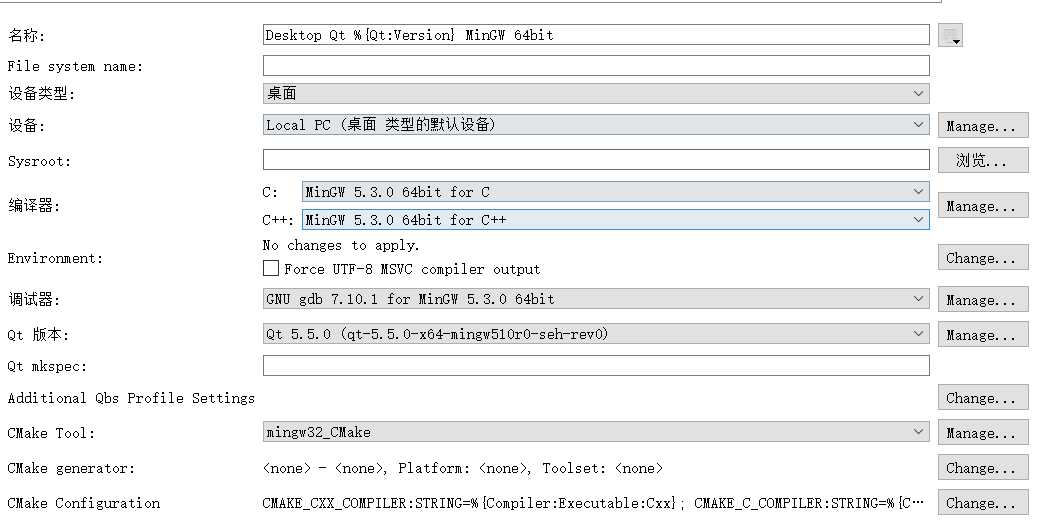
原文地址 https://blog.csdn.net/laowulong350/article/details/79130204 和我的有点偏差
评论(0)