
CSS中如何使用背景样式属性,看这篇文章就够用了
时间:2019-12-01 10:06:18
收藏:0
阅读:93
原文:CSS中如何使用背景样式属性,看这篇文章就够用了
css背景样式属性介绍#
- 背景样式就是自定义
HTML标签的背景颜色或背景图像。 - 背景属性说明表
| 属性名 | 属性值 | 描述 |
|---|---|---|
| background-color | #f00、red、rgb(255,0,0) | 设置背景颜色。 |
| background-image | url(背景图片路径) | 设置背景图像。 |
| background-repeat | repeat、repeat-x、repeat-y、no-repeat | 设置背景图片是否平铺和平铺方向。 |
| background-position | left、center、right、top、bottom、固定值、百分比 | 设置背景图片位置。 |
| background-attachment | scroll、fixed | 设置背景图片位置是否是固定或滚动。 |
| background | 属性值就是以上的所有值 | 设置背景的缩写形式。 |
属性为background-color使用方式#
- 让我们进入属性为
background-color实践,实践内容如:将HTML页面中的div背景设置为红色。 代码块
<!DOCTYPE html>
<html lang="en">
<head>
<meta charset="UTF-8">
<meta name="viewport" content="width=device-width, initial-scale=1.0">
<meta http-equiv="X-UA-Compatible" content="ie=edge">
<title>background-color属性使用</title>
<style>
div{
background-color: red;
}
</style>
</head>
<body>
<div></div>
</body>
</html>结果图

- 为什么我们给
div标签设置了background-color属性,还有属性值为red,div标签背景没有发生任何变化呢? - 原因有2点如:
div标签里面没有任何内容、div标签没有设置宽高度。 - 接下来我们在实践,将
div标签放置一些内容。 - 代码块
<!DOCTYPE html>
<html lang="en">
<head>
<meta charset="UTF-8">
<meta name="viewport" content="width=device-width, initial-scale=1.0">
<meta http-equiv="X-UA-Compatible" content="ie=edge">
<title>background-color属性使用</title>
<style>
div{
background-color: red;
}
</style>
</head>
<body>
<div>成功不是打败别人,而是改变自己。</div>
</body>
</html>- 结果图

- 现在属性为
background-color和属性值为red才真正的被渲染出来。 - 现在让我们将
div内容消除掉,然后我们给div设置宽高度为200px像素,看看属性为background-color和属性值为red,能否被渲染出来呢? 代码块
<!DOCTYPE html>
<html lang="en">
<head>
<meta charset="UTF-8">
<meta name="viewport" content="width=device-width, initial-scale=1.0">
<meta http-equiv="X-UA-Compatible" content="ie=edge">
<title>background-color属性使用</title>
<style>
div{
width: 200px;
height: 200px;
background-color: red;
}
</style>
</head>
<body>
<div></div>
</body>
</html>结果图

注意:现在大家应该明白了属性为
background-color,只有设置了宽高度的元素或者元素里面有内容,才能被渲染出来。
属性为background-image使用方式#
- 属性为
background-image用于给元素设置背景图片,将图片路径放在url()括号当中才会被渲染。 - 属性为
background-image和属性为background-color是一致的,都必须要有宽高度和内容才会被渲染。 让我们进入属性为
background-image实践,实践内容如:给div标签设置背景图片,div标签宽高度设置为400px像素。代码块
<!DOCTYPE html>
<html lang="en">
<head>
<meta charset="UTF-8">
<meta name="viewport" content="width=device-width, initial-scale=1.0">
<meta http-equiv="X-UA-Compatible" content="ie=edge">
<title>background-image属性使用</title>
<style>
div{
width: 400px;
height: 400px;
background-image: url(./img/001.png);
}
</style>
</head>
<body>
<div></div>
</body>
</html>结果图

注意:属性为
background-image默认图片是平铺的,所以这个结果图并不奇怪哈。
属性为background-repeat使用方式#
- 属性为
background-repeat有2种作用如: - 1、元素的背景图片是否平铺。
- 2、设置背景图片的水平方向平铺或垂直方向平铺。
- 属性为
background-repeat的属性值有4种如:repeat、repeat-x、repeat-y、no-repeat。 background-repeat属性值说明表:
| 属性值 | 描述 |
|---|---|
| repeat | background-repeat属性的默认值,作用表示背景图片平铺。 |
| repeat-x | 作用:将背景图片设置为水平方向平铺。 |
| repeat-y | 作用:将背景图片设置为垂直方向平铺。 |
| no-repeat | 作用:将背景图片设置为不平铺。 |
属性值为repeat实践#
- 让我们进入属性为
background-repeat并且属性值为repeat实践,实践内容如:将div标签背景图片设置为平铺。 代码块
<!DOCTYPE html>
<html lang="en">
<head>
<meta charset="UTF-8">
<meta name="viewport" content="width=device-width, initial-scale=1.0">
<meta http-equiv="X-UA-Compatible" content="ie=edge">
<title>background-repeat属性使用</title>
<style>
div{
width: 400px;
height: 400px;
background-image: url(./img/001.png);
background-repeat: repeat;
}
</style>
</head>
<body>
<div></div>
</body>
</html>结果图

注意:假设我们不设置属性为
background-repeat并且属性值为repeat,也没有关系的默认就是平铺。
属性值为repeat-x实践#
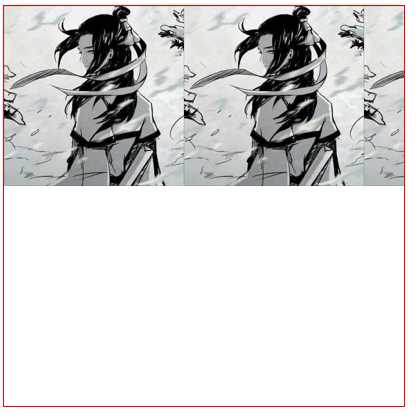
- 让我们进入属性为
background-repeat并且属性值为repeat-x实践,实践内容如:将div标签背景图片设置为水平方向平铺,为了给初学者一个直观的印象,笔者将div标签添加了一个边框样式。 代码块
<!DOCTYPE html>
<html lang="en">
<head>
<meta charset="UTF-8">
<meta name="viewport" content="width=device-width, initial-scale=1.0">
<meta http-equiv="X-UA-Compatible" content="ie=edge">
<title>background-repeat属性使用</title>
<style>
div{
width: 400px;
height: 400px;
border: 1px solid red;
background-image: url(./img/001.png);
background-repeat:repeat-x;
}
</style>
</head>
<body>
<div></div>
</body>
</html>结果图
属性值为repeat-y实践#
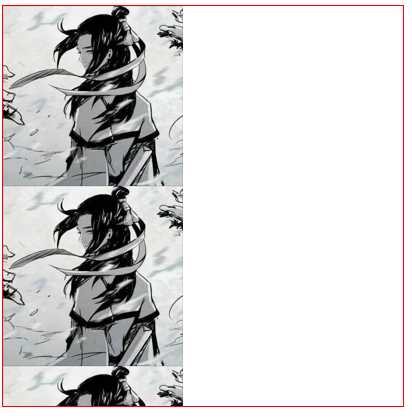
- 让我们进入属性为
background-repeat并且属性值为repeat-y实践,实践内容如:将div标签背景图片设置为垂直方向平铺,为了给初学者一个直观的印象,笔者将div标签添加了一个边框样式。 代码块
<!DOCTYPE html>
<html lang="en">
<head>
<meta charset="UTF-8">
<meta name="viewport" content="width=device-width, initial-scale=1.0">
<meta http-equiv="X-UA-Compatible" content="ie=edge">
<title>background-repeat属性使用</title>
<style>
div{
width: 400px;
height: 400px;
border: 1px solid red;
background-image: url(./img/001.png);
background-repeat:repeat-y;
}
</style>
</head>
<body>
<div></div>
</body>
</html>结果图
属性值为no-repeat实践#
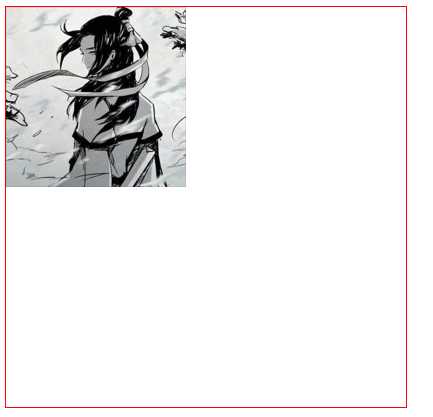
- 让我们进入属性为
background-repeat并且属性值no-repeat实践,实践内容如:将div标签背景图片设置为不平铺,为了给初学者一个直观的印象,笔者将div标签添加了一个边框样式。 代码块
<!DOCTYPE html>
<html lang="en">
<head>
<meta charset="UTF-8">
<meta name="viewport" content="width=device-width, initial-scale=1.0">
<meta http-equiv="X-UA-Compatible" content="ie=edge">
<title>background-repeat属性使用</title>
<style>
div{
width: 400px;
height: 400px;
border: 1px solid red;
background-image: url(./img/001.png);
background-repeat:no-repeat;
}
</style>
</head>
<body>
<div></div>
</body>
</html>结果图
属性为background-position使用方式#
- 属性为
background-position作用:设置背景图片的位置在哪。 - 属性为
background-position的属性值分为3种使用方式如:英文单词、固定值、百分比。 - 英文单词的表示说明如:
left(居左)、right(居右)、top(居上)、bottom(居下)、center(居中) - 让我们进入属性为
background-position使用英文单词设置背景的位置实践。 - 默认就是居上和居左我们就不实践了,如果是初学者可以尝试下。
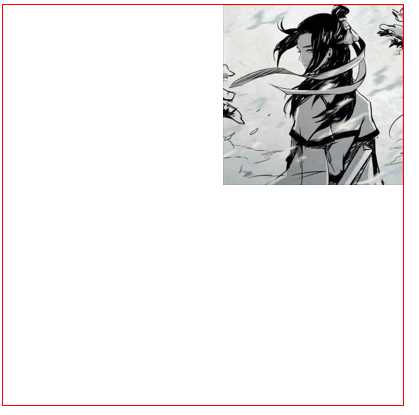
- 设置背景图片位置为居上和居右实践。
代码块
<!DOCTYPE html>
<html lang="en">
<head>
<meta charset="UTF-8">
<meta name="viewport" content="width=device-width, initial-scale=1.0">
<meta http-equiv="X-UA-Compatible" content="ie=edge">
<title>background-position属性使用</title>
<style>
div{
width: 400px;
height: 400px;
border: 1px solid red;
background-image: url(./img/001.png);
background-repeat:no-repeat;
background-position:center;
background-position: top right;
}
</style>
</head>
<body>
<div></div>
</body>
</html>结果图
- 设置背景图片位置为居下和居左实践。
代码块
<!DOCTYPE html>
<html lang="en">
<head>
<meta charset="UTF-8">
<meta name="viewport" content="width=device-width, initial-scale=1.0">
<meta http-equiv="X-UA-Compatible" content="ie=edge">
<title>background-position属性使用</title>
<style>
div{
width: 400px;
height: 400px;
border: 1px solid red;
background-image: url(./img/001.png);
background-repeat:no-repeat;
background-position:center;
background-position: bottom left;
}
</style>
</head>
<body>
<div></div>
</body>
</html>结果图

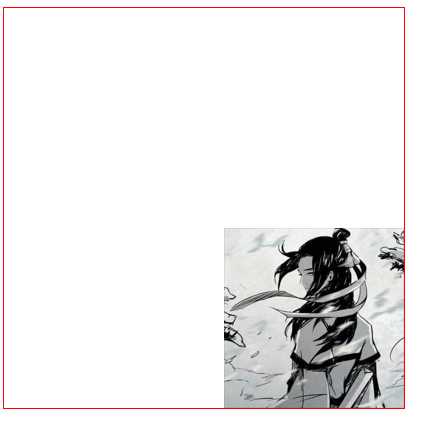
- 设置背景图片位置为居下和居右实践。
代码块
<!DOCTYPE html>
<html lang="en">
<head>
<meta charset="UTF-8">
<meta name="viewport" content="width=device-width, initial-scale=1.0">
<meta http-equiv="X-UA-Compatible" content="ie=edge">
<title>background-position属性使用</title>
<style>
div{
width: 400px;
height: 400px;
border: 1px solid red;
background-image: url(./img/001.png);
background-repeat:no-repeat;
background-position:center;
background-position: bottom right;
}
</style>
</head>
<body>
<div></div>
</body>
</html>结果图
- 设置背景图片位置为居中实践。
代码块
<!DOCTYPE html>
<html lang="en">
<head>
<meta charset="UTF-8">
<meta name="viewport" content="width=device-width, initial-scale=1.0">
<meta http-equiv="X-UA-Compatible" content="ie=edge">
<title>background-position属性使用</title>
<style>
div{
width: 400px;
height: 400px;
border: 1px solid red;
background-image: url(./img/001.png);
background-repeat:no-repeat;
background-position:center;
background-position: center center;
}
</style>
</head>
<body>
<div></div>
</body>
</html>结果图

- 以上就是英文单词设置背景图片的位置内容。
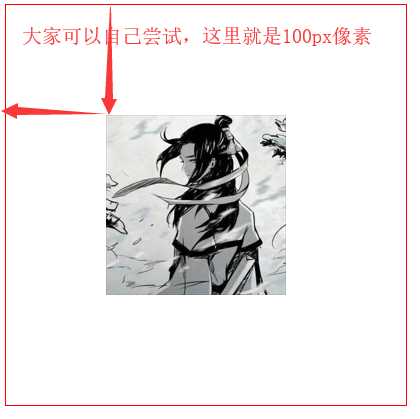
- 现在我们进入固定值和百分比设置
div标签背景图片的位置实践。 代码块
<!DOCTYPE html>
<html lang="en">
<head>
<meta charset="UTF-8">
<meta name="viewport" content="width=device-width, initial-scale=1.0">
<meta http-equiv="X-UA-Compatible" content="ie=edge">
<title>background-position属性使用</title>
<style>
div{
width: 400px;
height: 400px;
border: 1px solid red;
background-image: url(./img/001.png);
background-repeat:no-repeat;
background-position:center;
background-position: 100px;
}
</style>
</head>
<body>
<div></div>
</body>
</html>结果图
- 由于简单百分比就不进行代码实践了,
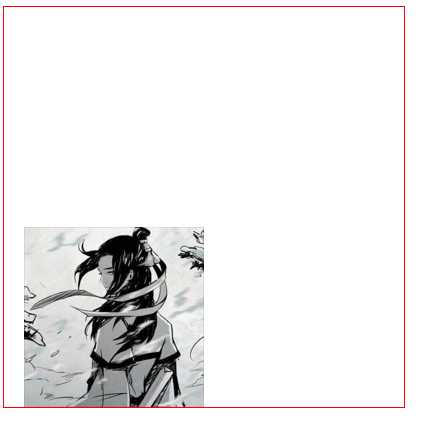
px单位换成%百分号就是按照元素的宽高度进行百分比计算背景图片的位置。 - 其实英文单词和固定值或百分比可以混合使用呢,笔者将背景图片位置设置为居下并且是水平向右
20px像素。 代码块
<!DOCTYPE html>
<html lang="en">
<head>
<meta charset="UTF-8">
<meta name="viewport" content="width=device-width, initial-scale=1.0">
<meta http-equiv="X-UA-Compatible" content="ie=edge">
<title>background-position属性使用</title>
<style>
div{
width: 400px;
height: 400px;
border: 1px solid red;
background-image: url(./img/001.png);
background-repeat:no-repeat;
background-position:center;
background-position: 20px bottom;
}
</style>
</head>
<body>
<div></div>
</body>
</html>结果图
属性为background-attachment使用方式#
- 属性为
background-attachment作用:就是设置背景图片位置是否是固定或者是滚动的。 - 属性为
background-attachment属性值说明表:
| 属性值 | 描述 |
|---|---|
| scroll | 设置背景图片滚动。 |
| fixed | 设置背景图片固定。 |
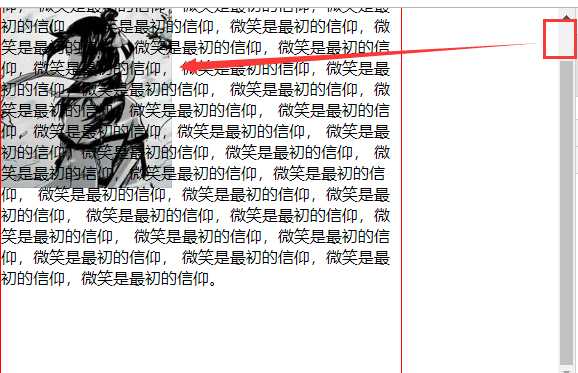
- 让我进入属性为
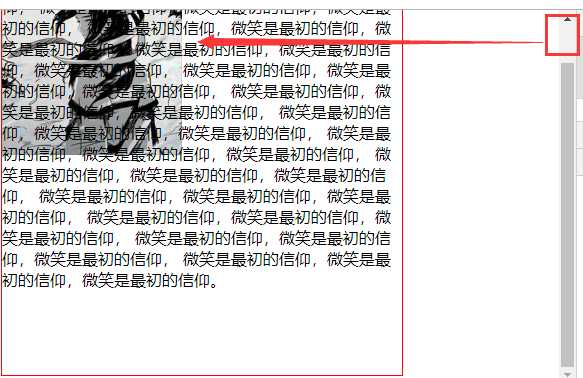
background-attachment实践,实践内容将div标签背景图片位置滚动和固定位置,方便大家理解滚动和固定笔者将在div标签中放置一些内容。 - 属性为
background-attachment默认属性值就是scroll滚动的。 - 背景图片位置滚动的实践
代码块
<!DOCTYPE html>
<html lang="en">
<head>
<meta charset="UTF-8">
<meta name="viewport" content="width=device-width, initial-scale=1.0">
<meta http-equiv="X-UA-Compatible" content="ie=edge">
<title>background-position属性使用</title>
<style>
div{
width: 400px;
height: 400px;
border: 1px solid red;
background-image: url(./img/001.png);
background-repeat:no-repeat;
background-attachment:scroll;
}
</style>
</head>
<body>
<div>
微笑是最初的信仰,微笑是最初的信仰,微笑是最初的信仰,
微笑是最初的信仰,微笑是最初的信仰,微笑是最初的信仰,
微笑是最初的信仰,微笑是最初的信仰,微笑是最初的信仰,
微笑是最初的信仰,微笑是最初的信仰,微笑是最初的信仰,
微笑是最初的信仰,微笑是最初的信仰,微笑是最初的信仰,
微笑是最初的信仰,微笑是最初的信仰,微笑是最初的信仰,
微笑是最初的信仰,微笑是最初的信仰,微笑是最初的信仰,
微笑是最初的信仰,微笑是最初的信仰,微笑是最初的信仰,
微笑是最初的信仰,微笑是最初的信仰,微笑是最初的信仰,
微笑是最初的信仰,微笑是最初的信仰,微笑是最初的信仰,
微笑是最初的信仰,微笑是最初的信仰,微笑是最初的信仰,
微笑是最初的信仰,微笑是最初的信仰,微笑是最初的信仰,
微笑是最初的信仰,微笑是最初的信仰,微笑是最初的信仰。
</div>
</body>
</html>结果图
- 背景图片位置固定实践
代码块
<!DOCTYPE html>
<html lang="en">
<head>
<meta charset="UTF-8">
<meta name="viewport" content="width=device-width, initial-scale=1.0">
<meta http-equiv="X-UA-Compatible" content="ie=edge">
<title>background-position属性使用</title>
<style>
div{
width: 400px;
height: 400px;
border: 1px solid red;
background-image: url(./img/001.png);
background-repeat:no-repeat;
background-attachment:fixed;
}
</style>
</head>
<body>
<div>
微笑是最初的信仰,微笑是最初的信仰,微笑是最初的信仰,
微笑是最初的信仰,微笑是最初的信仰,微笑是最初的信仰,
微笑是最初的信仰,微笑是最初的信仰,微笑是最初的信仰,
微笑是最初的信仰,微笑是最初的信仰,微笑是最初的信仰,
微笑是最初的信仰,微笑是最初的信仰,微笑是最初的信仰,
微笑是最初的信仰,微笑是最初的信仰,微笑是最初的信仰,
微笑是最初的信仰,微笑是最初的信仰,微笑是最初的信仰,
微笑是最初的信仰,微笑是最初的信仰,微笑是最初的信仰,
微笑是最初的信仰,微笑是最初的信仰,微笑是最初的信仰,
微笑是最初的信仰,微笑是最初的信仰,微笑是最初的信仰,
微笑是最初的信仰,微笑是最初的信仰,微笑是最初的信仰,
微笑是最初的信仰,微笑是最初的信仰,微笑是最初的信仰,
微笑是最初的信仰,微笑是最初的信仰,微笑是最初的信仰。
</div>
</body>
</html>结果图
属性为background使用方式#
- 属性为
background就是设置背景的一个缩写。本章内容大家都掌握了这个就如小菜一点不值一提哈,废话就不多说了直接上代码块咯。 代码块
<!DOCTYPE html>
<html lang="en">
<head>
<meta charset="UTF-8">
<meta name="viewport" content="width=device-width, initial-scale=1.0">
<meta http-equiv="X-UA-Compatible" content="ie=edge">
<title>background属性使用</title>
<style>
div{
width: 400px;
height: 400px;
border: 1px solid red;
background: url(./img/001.png) no-repeat top right scroll;
}
</style>
</head>
<body>
<div>
微笑是最初的信仰,微笑是最初的信仰,微笑是最初的信仰,
微笑是最初的信仰,微笑是最初的信仰,微笑是最初的信仰,
微笑是最初的信仰,微笑是最初的信仰,微笑是最初的信仰,
微笑是最初的信仰,微笑是最初的信仰,微笑是最初的信仰,
微笑是最初的信仰,微笑是最初的信仰,微笑是最初的信仰,
微笑是最初的信仰,微笑是最初的信仰,微笑是最初的信仰,
微笑是最初的信仰,微笑是最初的信仰,微笑是最初的信仰,
微笑是最初的信仰,微笑是最初的信仰,微笑是最初的信仰,
微笑是最初的信仰,微笑是最初的信仰,微笑是最初的信仰,
微笑是最初的信仰,微笑是最初的信仰,微笑是最初的信仰,
微笑是最初的信仰,微笑是最初的信仰,微笑是最初的信仰,
微笑是最初的信仰,微笑是最初的信仰,微笑是最初的信仰,
微笑是最初的信仰,微笑是最初的信仰,微笑是最初的信仰。
</div>
</body>
</html>结果图

评论(0)