
小程序短视频项目———开发用户信息之用户上传头像
时间:2018-10-04 09:15:31
收藏:0
阅读:260
一、后端用户头像上传接口开发
新建UsersController,用来开发与用户相关的业务
package com.imooc.controller;

import java.io.File;
import java.io.FileOutputStream;
import java.io.InputStream;
import java.util.UUID;

import org.apache.commons.lang3.StringUtils;
import org.apache.tomcat.util.http.fileupload.IOUtils;
import org.springframework.beans.BeanUtils;
import org.springframework.beans.factory.annotation.Autowired;
import org.springframework.web.bind.annotation.PostMapping;
import org.springframework.web.bind.annotation.RequestBody;
import org.springframework.web.bind.annotation.RequestMapping;
import org.springframework.web.bind.annotation.RequestParam;
import org.springframework.web.bind.annotation.RestController;
import org.springframework.web.multipart.MultipartFile;

import com.imooc.pojo.Users;
import com.imooc.pojo.vo.UsersVo;
import com.imooc.service.UserService;
import com.imooc.utils.IMoocJSONResult;
import com.imooc.utils.MD5Utils;

import io.swagger.annotations.Api;
import io.swagger.annotations.ApiImplicitParam;
import io.swagger.annotations.ApiOperation;

@RestController
@Api(value = "用户相关业务的接口",tags = {"用户相关业务的controller"})
@RequestMapping("/user")
public class UserController extends BasicController{

    @Autowired
    private UserService userService;


    @ApiOperation(value="用户上传头像", notes="用户上传头像的接口")
    @ApiImplicitParam(name="userId", value="用户id", required=true,
                        dataType="String", paramType="query")
    @PostMapping("/uploadFace")
    public IMoocJSONResult uploadFace(String userId,
            @RequestParam("file") MultipartFile[] files) throws Exception {

        //文件保存的空间
        String fileSpace = "D:/imooc_videos_dev";
        //保存到数据库的相对路径
        String uploadPathDB = "/" + userId + "/face" ;
        FileOutputStream fileOutputStream = null;
        InputStream inputStream = null;

        try {
            if(files != null && files.length > 0) {


                String fileName = files[0].getOriginalFilename();
                if(StringUtils.isNoneBlank(fileName)) {
                    //文件上传的最终路径
                    String finalFacePath = fileSpace + uploadPathDB + "/" + fileName;
                    //设置数据库保存的路径
                    uploadPathDB += ("/" + fileName);

                    File outFile = new File(finalFacePath);
                    if(outFile.getParentFile() != null || !outFile.getParentFile().isDirectory()) {

                        //创建父文件夹
                        outFile.getParentFile().mkdirs();
                    }

                    fileOutputStream = new FileOutputStream(outFile);
                    inputStream = files[0].getInputStream();
                    IOUtils.copy(inputStream, fileOutputStream);

                }
            }
        } catch (Exception e) {
            e.printStackTrace();
        }finally {
            if(fileOutputStream != null) {
                fileOutputStream.flush();
                fileOutputStream.close();
            }
        }


        return IMoocJSONResult.ok();

    }


}
二、小程序界面与后端用户上传头像联调
1、微信图片选中
wx.chooseImage(Object object)
从本地相册选择图片或使用相机拍照。
参数
Object object
| 属性 | 类型 | 默认值 | 是否必填 | 说明 | 支持版本 |
|---|---|---|---|---|---|
| count | number | 9 | 否 | 最多可以选择的图片张数 | |
| sizeType | Array.<string> | [‘original‘, ‘compressed‘] | 否 | 所选的图片的尺寸 | |
| sourceType | Array.<string> | [‘album‘, ‘camera‘] | 否 | 选择图片的来源 | |
| success | function | 否 | 接口调用成功的回调函数 | ||
| fail | function | 否 | 接口调用失败的回调函数 | ||
| complete | function | 否 | 接口调用结束的回调函数(调用成功、失败都会执行) |
object.sizeType 的合法值
| 值 | 说明 |
|---|---|
| original | 原图 |
| compressed | 压缩图 |
object.sourceType 的合法值
| 值 | 说明 |
|---|---|
| album | 从相册选图 |
| camera | 使用相机 |
object.success 回调函数
参数
Object res
| 属性 | 类型 | 说明 | 支持版本 |
|---|---|---|---|
| tempFilePaths | Array.<string> | 图片的本地临时文件路径列表 | |
| tempFiles | Array.<Object> | 图片的本地临时文件列表 | >= 1.2.0 |
res.tempFiles 的结构
| 属性 | 类型 | 说明 | 支持版本 |
|---|---|---|---|
| path | string | 本地临时文件路径 | |
| size | number | 本地临时文件大小,单位 B |
示例代码
wx.chooseImage({
  count: 1,
  sizeType: [‘original‘, ‘compressed‘],
  sourceType: [‘album‘, ‘camera‘],
  success (res) {
    // tempFilePath可以作为img标签的src属性显示图片
    const tempFilePaths = res.tempFilePaths
  }
})
2、微信图片上传
UploadTask wx.uploadFile(Object object)
将本地资源上传到开发者服务器,客户端发起一个 HTTPS POST 请求,其中 content-type 为 multipart/form-data。使用前请注意阅读相关说明。
参数
Object object
| 属性 | 类型 | 默认值 | 是否必填 | 说明 | 支持版本 |
|---|---|---|---|---|---|
| url | string | 是 | 开发者服务器地址 | ||
| filePath | string | 是 | 要上传文件资源的路径 | ||
| name | string | 是 | 文件对应的 key,开发者在服务端可以通过这个 key 获取文件的二进制内容 | ||
| header | Object | 否 | HTTP 请求 Header,Header 中不能设置 Referer | ||
| formData | Object | 否 | HTTP 请求中其他额外的 form data | ||
| success | function | 否 | 接口调用成功的回调函数 | ||
| fail | function | 否 | 接口调用失败的回调函数 | ||
| complete | function | 否 | 接口调用结束的回调函数(调用成功、失败都会执行) |
object.success 回调函数
参数
Object res
| 属性 | 类型 | 说明 | 支持版本 |
|---|---|---|---|
| data | string | 开发者服务器返回的数据 | |
| statusCode | number | 开发者服务器返回的 HTTP 状态码 |
返回值
UploadTask
支持版本 >= 1.4.0
一个可以监听上传进度进度变化的事件和取消上传的对象
示例代码
wx.chooseImage({
  success (res) {
    const tempFilePaths = res.tempFilePaths
    wx.uploadFile({
      url: ‘https://example.weixin.qq.com/upload‘, //仅为示例,非真实的接口地址
      filePath: tempFilePaths[0],
      name: ‘file‘,
      formData: {
        ‘user‘: ‘test‘
      },
      success (res){
        const data = res.data
        //do something
      }
    })
  }
})
3、mine.js文件更改头像事件编写
changeFace: function(){
    wx.chooseImage({
      count: 1,
      sizeType: [ ‘compressed‘],
      sourceType: [‘album‘],
      success(res) {
        var tempFilePaths = res.tempFilePaths;
        console.log(tempFilePaths);

        wx.showLoading({
          title: ‘Loading...‘,
        })


        var serverUrl = app.serverUrl;
        wx.uploadFile({
          url: serverUrl + ‘/user/uploadFace?userId=‘ + app.userInfo.id,
          filePath: tempFilePaths[0],
          name: ‘file‘,
          header: {
            ‘content-type‘: ‘application/json‘ // 默认值
          },
          success(res) {
            var data = res.data
            console.log(data);
            wx.hideLoading();
            wx.showToast({
              title: ‘success‘,
              icon: "success"
            })
          }
        })


      }
    })
  }
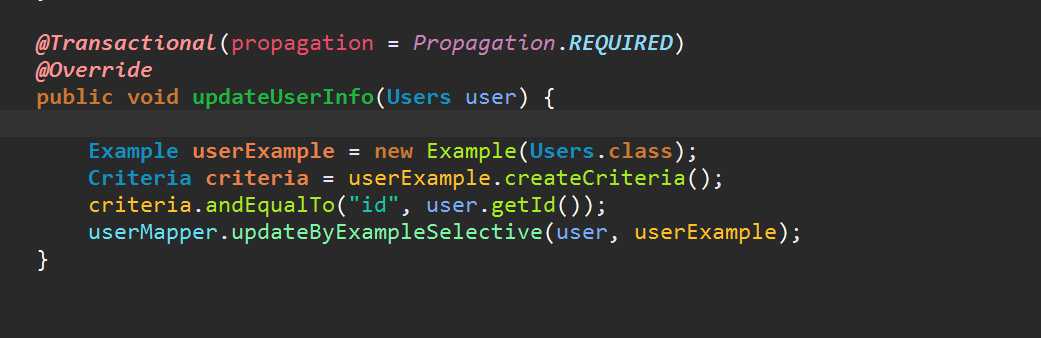
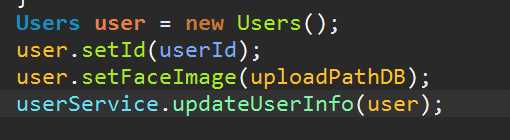
三、上传头像后更新到数据库
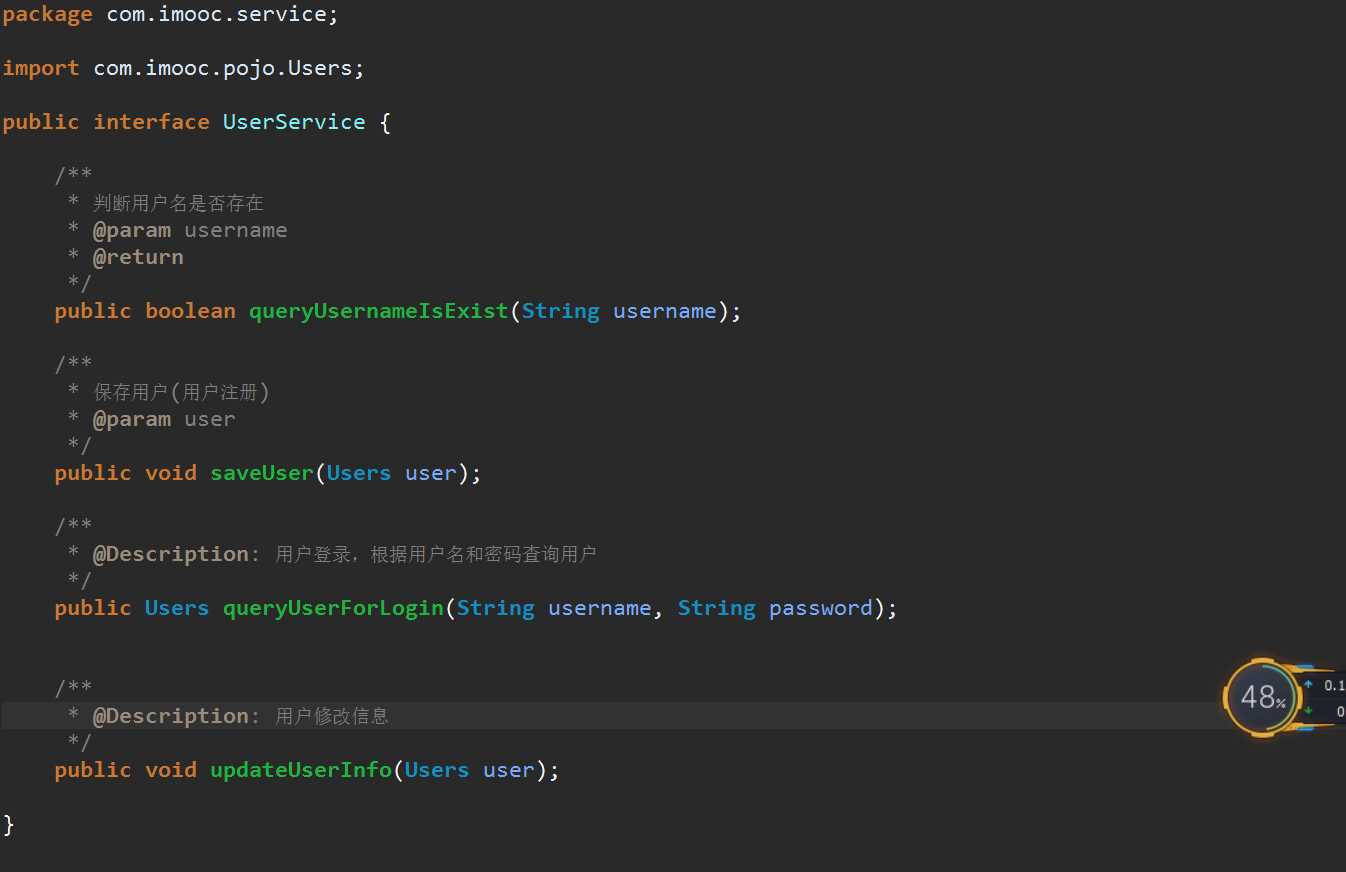
userServiceImpl
UserController
四、完整的前端js
 changeFace: function(){
    var me = this;
    wx.chooseImage({
      count: 1,
      sizeType: [ ‘compressed‘],
      sourceType: [‘album‘],
      success(res) {
        var tempFilePaths = res.tempFilePaths;
        console.log(tempFilePaths);

        wx.showLoading({
          title: ‘Loading...‘,
        })


        var serverUrl = app.serverUrl;
        wx.uploadFile({
          url: serverUrl + ‘/user/uploadFace?userId=‘ + app.userInfo.id,
          filePath: tempFilePaths[0],
          name: ‘file‘,
          header: {
            ‘content-type‘: ‘application/json‘ // 默认值
          },
          success(res) {
            var data = JSON.parse(res.data);
            console.log(data);
            wx.hideLoading();
            if (data.status == 200) {
              wx.showToast({
                title: ‘success‘,
                icon: "success"
              });
              var imageUrl = data.data;
              me.setData({
                faceUrl: serverUrl + imageUrl
              })


            }else if (data.status == 500){
              wx.showToast({
                title: data.msg,
              })
            }

          }
        })

      }
    })
  }
评论(0)