
Linux 进程及作业管理
Linux 进程及作业管理
概述:
一、进程的相关概念:
1.相关定义:
内核的功用:
进程管理、文件系统、网络功能、内存管理、驱动程序、安全功能等;
通俗的来说进程是运行起来的程序。唯一标识进程的是进程描述符(PID),在linux内核中是通过task_struck和task_list来定义和管理进程的 ;
进程 Process:
运行中的程序的一个副本,是被载入内存的一个指令集合;
˙进程ID(Process ID,PID)号码被用来标记各个进程;
˙UID、GID、和SELinux语境决定对文件系统的存取和访问权限;
˙通常从执行进程的用户来继承;
˙存在生命周期;
task struct:Linux内核存储进程信息的数据结构格式;
task list:多个任务的的task struct组成的链表;
2.进程创建:
init:第一个进程
父子关系
进程:都由其父进程创建,COW(写实复制)
fork(), clone()
创建过程:
1.系统首先以fock的方式复制(cow)一个与父进程相同的进程,这个进程与父进程唯一的差别就是PID不同,但是这个进程还会多一个PPID的参数,PPID就是父进程的程序识别码PID;
2.然后新产生的进程开始加载实际要运行的程序进行执行。
3.进程优先级:
进程的优先级是用数字0-139来表示的,分为两类:
99-1:实时优先级,由内核维护(数字越大,优先级越高)
100-139:静态优先级,使用nice值来调整(数字越小,优先级越高);
Nice值:
-20,19对应静态优先级100-139
Big O:
时间复杂度,用时和规模的关系
O(1), O(logn), O(n)线性, O(n^2)抛物线, O(2^n)
4.进程内存:
Page Frame: 页框,用存储页面数据,存储Page 4k;
LRU:Least Recently Used 近期最少使用算法,释放内存;
注:内存管理的一种页面置换算法,对于在内存中但又不用的数据块(内存块)叫做LRU, 操作系统会根据哪些数据属于LRU而将其移出内存而腾出空间来加载另外的数据。物理地址空间和线性地址空间;
MMU(内存管理单元):负责转换线性和物理地址
注:MMU是Memory Management Unit的缩写,中文名是内存管理单元,它是中央处理器(CPU) 中用来管理虚拟存储器、物理存储器的控制线路,同时也负责虚拟地址映射为物理地址, 以及 提供硬件机制的内存访问授权,多用户多进程操作系统。
5.IPC: 进程间通信 Inter Process Communication
在计算机网络体系中,主机与主机之间的通信,实质上是主机进程与主机进程之间的通信,也就是进程间的通信;
同一主机上
signal:信号指令;
shm: shared memory 共享内存空间
semophore:信号量,一种计数器
不同主机上:
rpc: remote procedure call
socket: 套接字,IP和端口号
6.Linux内核:抢占式多任务
7.进程类型:
根据进程与终端的关系可以分为:
守护进程: daemon,在系统引导过程中启动的进程,和终端无关的进程;
前台进程:跟终端相关,通过终端启动的进程;
注意:两者可相互转化
8.进程状态:
进程被内核调度的过程中的状态可以分为:
运行态:running
就绪态:ready
睡眠态:
可中断:interruptable
不可中断:uninterruptable,
通常是指被IO阻塞的过程,等待IO满足之前无法继续运行。
停止态:stopped,暂停于内存中,但不会被调度,除非手动启动;
僵死态:zombie,结束进程,父进程结束前,子进程不关闭
9.进程的分类:
CPU-Bound:CPU密集型,非交互;
IO-Bound:IO密集型,交互;
根据在linux不同模式下运行分为:
核心态:这类进程运行在内核模式下,执行一些内核指令(Ring 0)。
用户态:这类进程工作在用户模式下,执行用户指令(Ring 3)。
如果用户态的进程要执行一些核心态的指令,此时就会产生系统调用,系统调用会请求内核指令完成相关的请求,就执行的结果返回给用户态进程。
10.进程与线程的关系:
进程是程序执行时的一个实例,即它是程序已经执行到课中程度的数据结构的汇集。从内核的观点看,进程的目的就是担当分配系统资源(CPU时间、内存等)的基本单位
线程是进程的一个执行流,是CPU调度和分派的基本单位,它是比进程更小的能独立运行的基本单位。一个进程由几个线程组成(拥有很多相对独立的执行流的用户程序共享应用程序的大部分数据结构),线程与同属一个进程的其他的线程共享进程所拥有的全部资源。
进程——资源分配的最小单位,线程——程序执行的最小单位
从函数调用上来说,进程创建使用fork()操作;线程创建使用clone()操作
参考资料:《Linux内核设计与实现》《深入理解Linux内核》
二、进程的系统管理工具:
Linux系统状态的查看及管理工具:
pstree, ps, pidof, pgrep, top, htop, glance, pmap, vmstat, dstat, kill pkill, job, bg, fg, nohup
CentOS 5:SysV init
CentOS 6:upstart
CentOS 7:systemd
/sbin/init
1.pstree命令:
pstree-display a tree of processes(显示查看进程树)
以下为CentOS 6 和 CentOS 7 的区别
[root@CentOS6 ~]# pstree
init─┬─abrtd           #可以看到都是有init生成的
     ├─acpid
     ├─atd
     ├─auditd───{auditd}
     ├─automount───4*[{automount}]
     ├─bonobo-activati───{bonobo-activat}
     ├─clock-applet
     ├─console-kit-dae───63*[{console-kit-da}]
     ├─crond
     ├─cupsd
     ├─2*[dbus-daemon]
     ├─2*[dbus-launch]
     ├─devkit-power-da
     ├─dhclient
     ├─gconf-im-settin
     ├─gconfd-2
[root@centos7 ~]# pstree
systemd─┬─NetworkManager─┬─2*[dhclient]
│ └─2*[{NetworkManager}]
├─2*[abrt-watch-log]
├─abrtd
├─alsactl
├─atd
├─auditd─┬─audispd─┬─sedispatch
│ │ └─{audispd}
│ └─{auditd}
├─chronyd
├─crond
├─cupsd
├─dbus-daemon
├─gssproxy───5*[{gssproxy}]
├─login───bash
├─lsmd
├─lvmetad
├─master─┬─pickup
│ └─qmgr
├─polkitd───5*[{polkitd}]2./proc:内核中的状态信息;
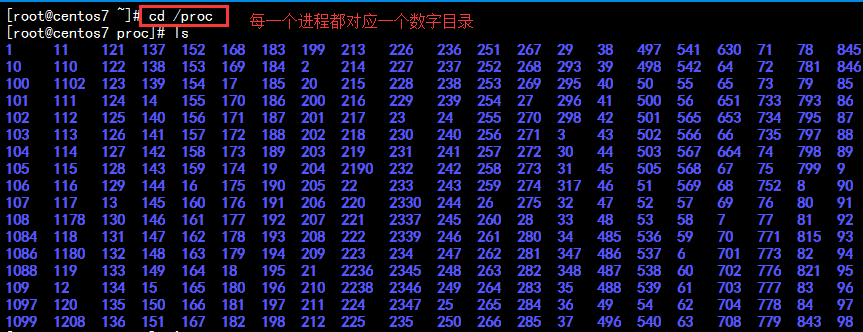
Linux系统各进程的相关信息均保存在/proc/PID目录下的各文件中
Linux 内核提供了一种通过 /proc 文件系统,在运行时访问内核内部数据结构、改变内核设置的机制。proc文件系统是一个伪文件系统,它只存在内存当中,而不占用外存空间。它以文件系统的方式为访问系统内核数据的操作提供接口。
内核参数:
可设置其值从而调整内核运行特性的参数,在/proc/sys/下;
状态变量:其用于输出内核中统计信息或状态信息,仅用于查看;
参数:模拟成文件系统;
进程:
/proc/#:
#:PID
2.启动进程的方式:
系统启动过程中自动启动:与终端无关的进程;
用户通过终端启动:与终端相关的进程
三、显示系统当前进程的运行情况
ps: process state
ps-report a snapshot of the current processes
1.使用ps来查看进程信息
语法:ps[OPTION]...
支持三种选项:
UNIX选项 如 -a
BSD选项 如 a
GUN选项 如 --help
选项和参数
默认显示当前终端中的进程;
a 所有与终端相关的进程;
x 所有与终端无关的进程;
u 显示进程所有者的信息;
f 显示进程的父进程;
o属性… 选项显示定制的信息:
示例:如下
[root@CentOS6 1]# ps a
   PID TTY      STAT   TIME COMMAND
  2024 tty2     Ss+    0:00 /sbin/mingetty /dev/tty2
  2026 tty3     Ss+    0:00 /sbin/mingetty /dev/tty3
  2028 tty4     Ss+    0:00 /sbin/mingetty /dev/tty4
  2030 tty5     Ss+    0:00 /sbin/mingetty /dev/tty5
  2032 tty6     Ss+    0:00 /sbin/mingetty /dev/tty6
  2105 tty1     Ss+    0:00 -bash
  3922 pts/1    Ss+    0:00 /bin/bash
  4864 pts/2    Ss     0:00 -bash
  5142 pts/2    R+     0:00 ps a
[root@CentOS6 1]# ps
   PID TTY          TIME CMD
  4864 pts/2    00:00:00 bash
  5144 pts/2    00:00:00 ps
[root@CentOS6 1]# ps aux
USER        PID %CPU %MEM    VSZ   RSS TTY      STAT START   TIME COMMAND
root          1  0.0  0.1  19344  1632 ?        Ss   08:27   0:01 /sbin/init
root          2  0.0  0.0      0     0 ?        S    08:27   0:00 [kthreadd]
root          3  0.0  0.0      0     0 ?        S    08:27   0:00 [migration/0]
root          4  0.0  0.0      0     0 ?        S    08:27   0:00 [ksoftirqd/0]
root          5  0.0  0.0      0     0 ?        S    08:27   0:00 [stopper/0]
root          6  0.0  0.0      0     0 ?        S    08:27   0:00 [watchdog/0]
root          7  0.0  0.0      0     0 ?        S    08:27   0:18 [events/0]
root          8  0.0  0.0      0     0 ?        S    08:27   0:00 [events/0]
root          9  0.0  0.0      0     0 ?        S    08:27   0:00 [events_long/0]
root         10  0.0  0.0      0     0 ?        S    08:27   0:00 [events_power_ef]
root         11  0.0  0.0      0     0 ?        S    08:27   0:00 [cgroup]
root         12  0.0  0.0      0     0 ?        S    08:27   0:00 [khelper]
2.常用组合之一:aux
VSZ: Virtual memory SiZe,虚拟内存集,线性内存
RSS: ReSidentSize, 常驻内存集
STAT:进程状态
    R:running
    S: interruptable sleeping 可中断睡眠
    D: uninterruptable sleeping 不可中断睡眠
    T: stopped 停止状态
    Z: zombie  僵死态
    +: 前台进程
    l: 多线程进程
    N:低优先级进程
    <: 高优先级进程
    s: session leader,会话(子进程)发起者
3.常用组合之二:-ef
-e: 显示所有进程
-f: 显示完整格式程序信息
[root@CentOS6 1]# ps -ef
UID         PID   PPID  C STIME TTY          TIME CMD
root          1      0  0 08:27 ?        00:00:01 /sbin/init
root          2      0  0 08:27 ?        00:00:00 [kthreadd]
root          3      2  0 08:27 ?        00:00:00 [migration/0]
root          4      2  0 08:27 ?        00:00:00 [ksoftirqd/0]
root          5      2  0 08:27 ?        00:00:00 [stopper/0]
root          6      2  0 08:27 ?        00:00:00 [watchdog/0]
root          7      2  0 08:27 ?        00:00:20 [events/0]
root          8      2  0 08:27 ?        00:00:00 [events/0]
root          9      2  0 08:27 ?        00:00:00 [events_long/0]
root         10      2  0 08:27 ?        00:00:00 [events_power_ef]
root         11      2  0 08:27 ?        00:00:00 [cgroup]
root         12      2  0 08:27 ?        00:00:00 [khelper]
root         13      2  0 08:27 ?        00:00:00 [netns]
root         14      2  0 08:27 ?        00:00:00 [async/mgr]
4.常用组合之三:-eFH
-F: 显示更完整格式的进程信息
C:cpu utillization
PSR:运行于哪颗cpu之上
-H: 以进程层级格式显示进程相关信息
[root@CentOS6 1]# ps -eFH
UID         PID   PPID  C    SZ   RSS PSR STIME TTY          TIME CMD
root          2      0  0     0     0   0 08:27 ?        00:00:00 [kthreadd]
root          3      2  0     0     0   0 08:27 ?        00:00:00   [migration/0]
root          1      0  0  4836  1632   0 08:27 ?        00:00:01 /sbin/init
root        581      1  0  2709   952   0 08:27 ?        00:00:00   /sbin/udevd -d
root       2033    581  0  2708   940   0 08:27 ?        00:00:00     /sbin/udevd -d
root       2034    581  0  2708   920   0 08:27 ?        00:00:00     /sbin/udevd -d
root       1525      1  0  6899   868   0 08:27 ?        00:00:00   auditd
root       1559      1  0 62288  1696   0 08:27 ?        00:00:00   /sbin/rsyslogd -i /var/run/syslogd.pid -c 5
rpc        1610      1  0  4745   892   0 08:27 ?        00:00:00   rpcbind
dbus       1630      1  0  5559  1700   0 08:27 ?        00:00:00   dbus-daemon --system
rpcuser    1652      1  0  5838  1380   0 08:27 ?        00:00:00   rpc.statd
root       1687      1  0 47243  3360   0 08:27 ?        00:00:00   cupsd -C /etc/cups/cupsd.conf
常用组合之四 :-eo axo
o field1,field2...:自定义要显示的字段,以逗号分隔;
常用的字段:pid,ni,pri,pcpu,stat,comm,tty,ppid
ni: nice值
pri: priority,优先级
psr: processor, CPU编号
rtprio: 实时优先级
[root@CentOS6 1]# ps -eo pid,tty,ni,comm
   PID TT        NI COMMAND
     1 ?          0 init
     2 ?          0 kthreadd
     3 ?          - migration/0
     4 ?          0 ksoftirqd/0
     5 ?          - stopper/0
     6 ?          - watchdog/0
     7 ?          0 events/0
     8 ?          0 events/0
     9 ?          0 events_long/0
    10 ?          0 events_power_ef
    11 ?          0 cgroup