
wpf datagrid row height 行高自动计算使每行行高自适应文本
时间:2016-06-03 01:06:30
收藏:0
阅读:1741
wpf 的datagrid的行高 要么是Auto,要么是定值:但会带来麻烦就是每行行高都一样。
当需要按内容(主要是wrap 换行的textbox或textblock)来动态调整行高的时候,需要用到dataGrid的LoadingRow 事件。
参考两个网页:
http://stackoverflow.com/questions/9264398/how-to-calculate-wpf-textblock-width-for-its-known-font-size-and-characters
http://www.codeproject.com/Articles/5521/Advanced-DataGrid-sizing
代码注释详细,不做细谈。
代码如下:
 private void dgList_LoadingRow(object sender, DataGridRowEventArgs e)
        {
            e.Row.Height = 30;
            //粗略计算行高。为了更好的显示效果
           ContentInfo info = (ContentInfo)e.Row.DataContext;
            if (info != null)
            {
                //计算最大长度的文本
                string maxLengthString = info.name1.Length > info.name2.Length ? info.name1: info.name2;
                //获取换行文本的文本框宽度,即template里面的textbox或textblock的实际宽度
                double textBoxWidth = (this.ActualWidth - 300) / 2;

                var formattedText = new FormattedText(
    maxLengthString ,
    CultureInfo.CurrentUICulture,
    FlowDirection.LeftToRight,
    new Typeface(new FontFamily("微软雅黑"), FontStyles.Normal, FontWeights.Normal, FontStretches.Normal),
    12,
    Brushes.Black);

                double calculateHeight = formattedText.Height * (formattedText.Width / textBoxWidth);
                e.Row.Height = 30 > calculateHeight ? 30 : calculateHeight;
            }
        }
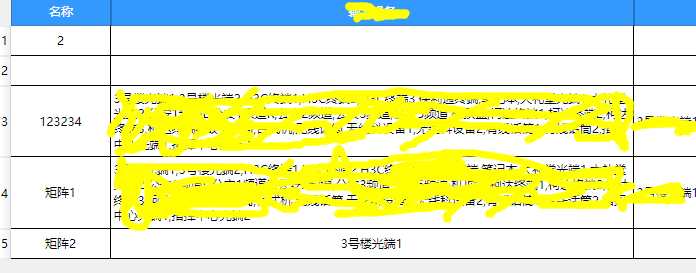
效果(每行行高都不一样,自适应了):
转载请注明出处,谢谢。 有问题请联系:lzj_999@126.com
评论(0)